
In today's digital landscape, Search Engine Optimization (SEO) is paramount for businesses aiming to establish a strong online presence. Among the plethora of tools available to SEO professionals, the Google Keyword Planner stands out as a powerful and versatile resource. This guide delves into the intricacies of Keyword Planner, exploring how it can be leveraged to maximize your SEO efforts and drive organic traffic to your website.
Getting Started with Keyword Planner
Before diving into the advanced functionalities, it's crucial to understand the basics of accessing and setting up Keyword Planner.
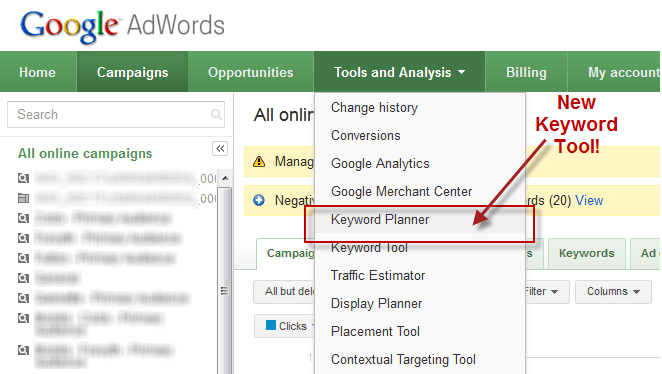
Accessing Google Keyword Planner
Google Keyword Planner is a free tool provided by Google Ads. To access it, you'll need a Google account. Here’s a step-by-step guide:
Accessing Keyword Planner is straightforward, but understanding its interface is the first step towards effective keyword research.
Setting up Your First Campaign
While Keyword Planner can be used without running an active ad campaign, setting up a campaign can provide more accurate and comprehensive data. Here’s how to set up a basic campaign:
Setting up a campaign, even a basic one, allows you to gather more precise data from Keyword Planner, enhancing your ability to refine your SEO strategy.
Understanding Basic Terminology
Before delving deeper, it's essential to grasp the fundamental terminology used in Keyword Planner:
- Keywords: Words or phrases that people type into search engines to find information.
- Search Volume: The average number of times a keyword is searched for in a given period (usually monthly).
- Competition: The level of competition for a keyword in Google Ads. It indicates how many advertisers are bidding on that keyword.
- Cost Per Click (CPC): The amount an advertiser pays each time someone clicks on their ad.
- Impression: Each time your ad is shown to a user.
- Click-Through Rate (CTR): The percentage of impressions that result in a click.
- Conversion Rate: The percentage of clicks that result in a desired action, such as a purchase or form submission.
Familiarizing yourself with these terms will enable you to interpret the data provided by Keyword Planner more effectively.
Exploring Keyword Planner Features
Keyword Planner offers a range of features designed to help you discover, analyze, and forecast keyword performance.
Keyword Discovery and Brainstorming

One of the primary functions of Keyword Planner is to help you discover new keywords and brainstorm ideas for your SEO strategy. There are two main options for keyword discovery:
To discover new keywords:
By exploring these suggestions, you can uncover long-tail keywords and niche topics that you may not have considered before.
Analyzing Keyword Data and Metrics
Once you have a list of keywords, it's important to analyze their data and metrics to determine their potential value. Keyword Planner provides several key metrics to consider:
- Average Monthly Searches: This is the most basic metric, indicating how many times a keyword is searched for each month.
- Competition: This metric reflects the level of competition for a keyword in paid search. While it doesn’t directly translate to organic search competition, it can provide insights into the keyword’s overall competitiveness.
- CPC (Cost Per Click): This metric shows the average cost per click for a keyword in Google Ads. While it's primarily relevant for paid advertising, it can also indicate the keyword's commercial value.
- Organic Impression Share: This metric shows the percentage of times your website appears in organic search results for a given keyword.
- Organic Average Position: This metric shows the average position of your website in organic search results for a given keyword.
By analyzing these metrics, you can identify keywords that have a high search volume, low competition, and strong commercial value. These are the keywords that are most likely to drive traffic and conversions to your website.
Forecasting Keyword Performance
In addition to analyzing historical data, Keyword Planner can also be used to forecast the potential performance of your keywords. By entering your keywords into the “Get Search Volume and Forecasts” tool, you can see estimates of:
- Clicks: The number of clicks you can expect to receive if you target a particular keyword.
- Impressions: The number of times your ad will be shown for a particular keyword.
- CTR (Click-Through Rate): The percentage of impressions that will result in a click.
- Cost: The total cost of targeting a particular keyword.
- Conversions: The number of conversions you can expect to receive if you target a particular keyword.
- Conversion Rate: The percentage of clicks that will result in a conversion.
These forecasts are based on historical data and can be influenced by a variety of factors, such as your budget, bidding strategy, and ad quality. However, they can provide valuable insights into the potential ROI of your SEO efforts. Understanding these forecasts helps in making informed decisions about which keywords to target and how to allocate your resources effectively.
Maximizing Your SEO Efforts with Keyword Planner
Now that you understand the basics of Keyword Planner and its features, let's explore how you can use it to maximize your SEO efforts.
Creating Content that Ranks
One of the most effective ways to use Keyword Planner is to create content that ranks high in search results. Here’s a strategic approach:
By creating high-quality, targeted content, you can improve your website’s visibility in search results and attract more organic traffic.
Improving Website Visibility
In addition to creating content, Keyword Planner can also be used to improve your website’s overall visibility in search results. Here are some strategies to consider:
- Identify Ranking Opportunities: Use Keyword Planner to identify keywords that you are not currently ranking for but have the potential to rank for.
- Optimize Existing Content: Optimize your existing content for these keywords by adding them to your title tags, meta descriptions, and body text.
- Build Internal Links: Build internal links between your pages to improve your website’s navigation and structure.
- Fix Technical SEO Issues: Address any technical SEO issues that may be preventing your website from ranking, such as broken links, slow loading speeds, and mobile-friendliness.
- Monitor Your Rankings: Track your rankings for your target keywords to see how your website is performing over time.
By implementing these strategies, you can improve your website’s overall visibility in search results and attract more organic search traffic.
Tracking and Measuring Results
Finally, it's important to track and measure the results of your SEO efforts to see what's working and what's not. Keyword Planner can be used to track:
- Keyword Rankings: Monitor your website’s rankings for your target keywords over time.
- Organic Traffic: Track the amount of organic traffic your website is receiving from search engines.
- Conversion Rates: Measure the percentage of organic visitors who are converting into leads or customers.
- ROI (Return on Investment): Calculate the ROI of your SEO efforts by comparing the cost of your SEO activities to the revenue generated from organic traffic.
By tracking these metrics, you can gain valuable insights into the effectiveness of your SEO strategy and make data-driven decisions to improve your results. Regularly monitoring these metrics ensures continuous improvement and optimization of your SEO strategy.
In conclusion, Google Keyword Planner is a powerful SEO tool that helps boost your website’s visibility and drive organic traffic. By leveraging its features—like keyword insights and performance tracking—you can refine your strategy, optimize marketing efforts, and stay competitive in the digital landscape. Mastering tools like Keyword Planner is key to ongoing SEO success.


Messenger